
iPhone & iPad · iOS 17 or later
Keep the words.
Cut the silence.
Skipause shortens the quiet stretches in your videos and voice recordings — then shows you every cut, so you can keep the pauses that carry meaning.
Coming soon to the App Store
In App Store preparation. There is no download link yet.
- One-time purchase
- No account
- No tracking SDK
A good take is usually a few seconds of dead air away from being a good take.
Trimming pauses by hand is slow, and it feels irreversible. Skipause finds low-volume stretches, shows you exactly what it took out, and writes a new file. Your original stays where it is.
How it works
Three steps, and one of them is listening.
Nothing is final until you export. The review step is not decoration: a detector that measures loudness cannot tell a soft sentence from silence.
-
01
Record or import
Start a voice take in the app, open a file, or pick a video from Photos. Files you choose from a cloud provider may need to download first.
-
02
Listen, then keep what matters
Play the shorter version and step through each pause. Hear the original around the cut and keep the ones you want. Adjust the threshold, the minimum pause length and the room left around speech if the first pass is too eager.
-
03
Save a separate copy
Export a new file, share it, or save a finished video to Photos. Video export is up to 1080p SDR; audio is AAC. Your original media is never modified or deleted.
A real project
From a recording to a shorter copy.
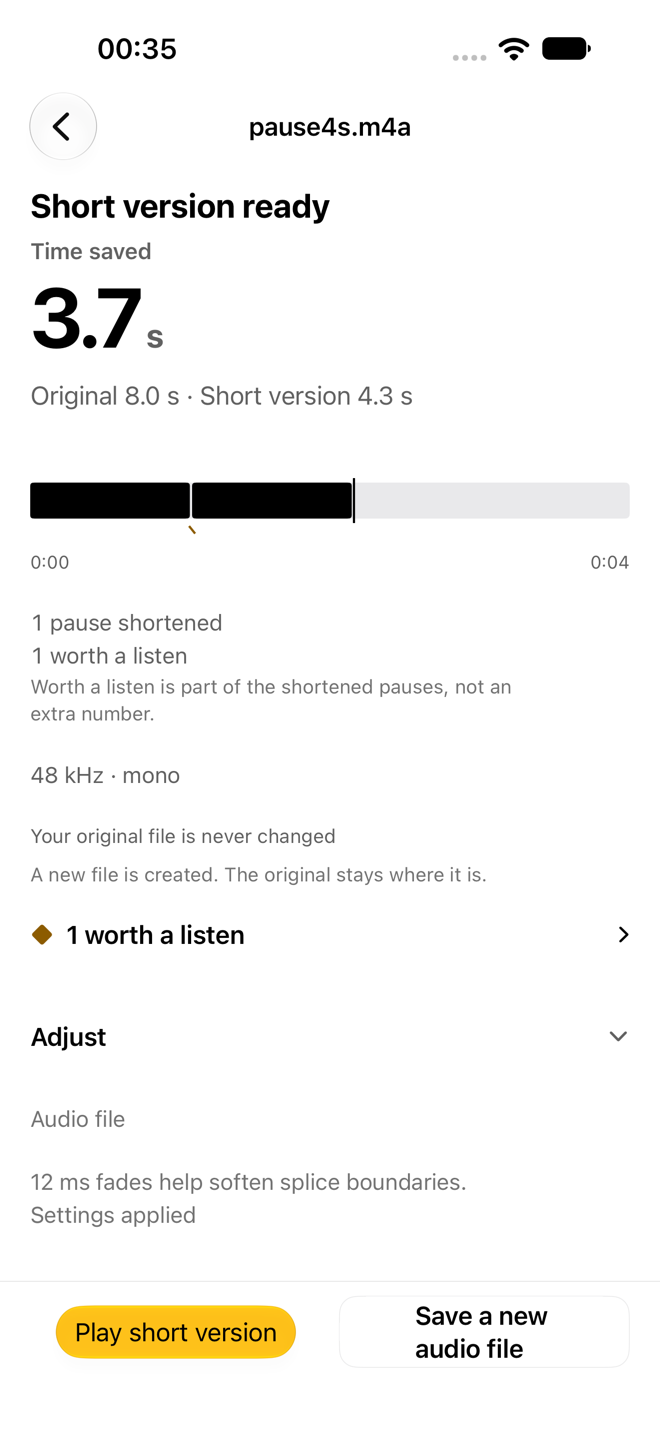
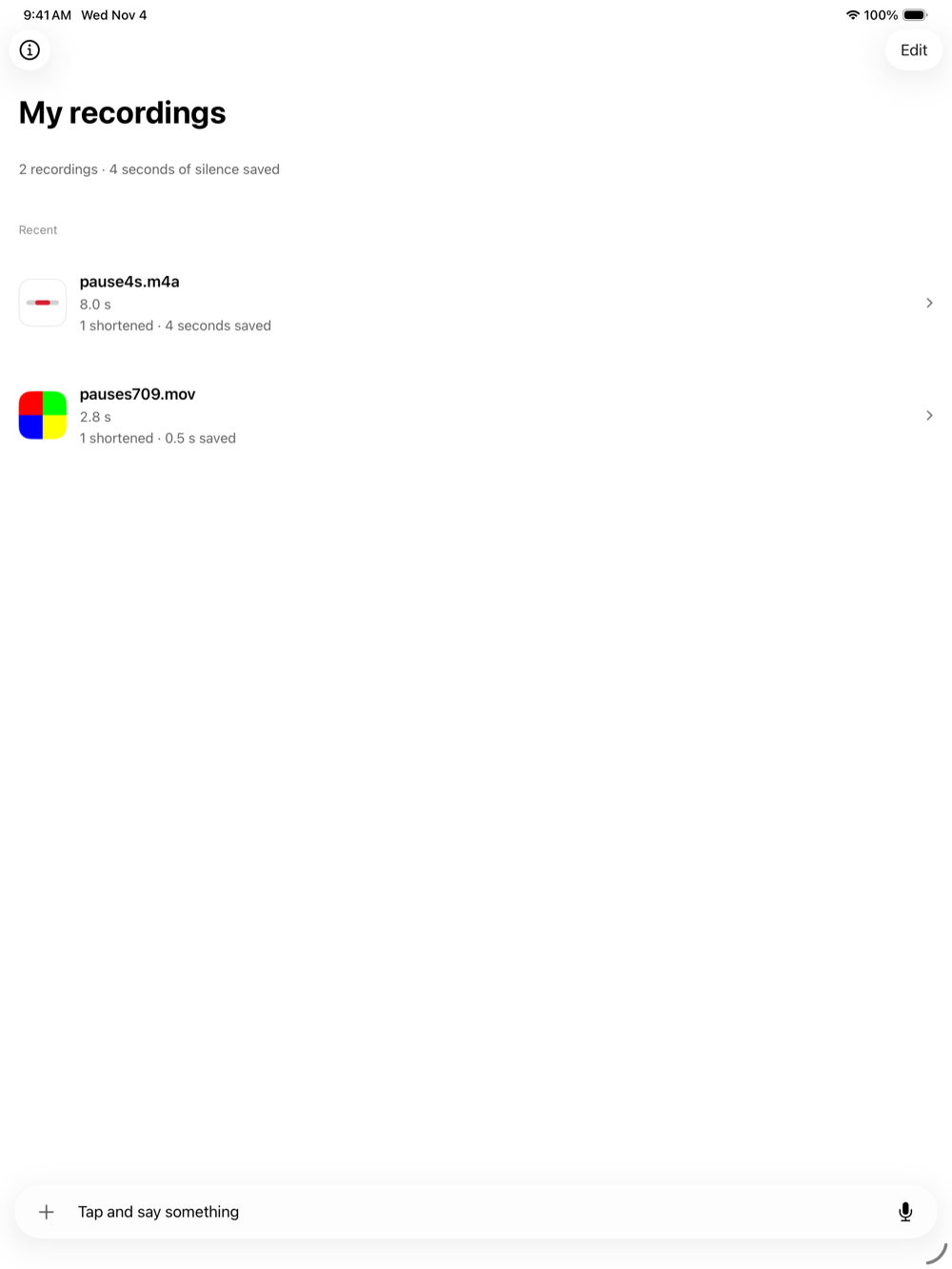
Screens from the current native interface, captured on iPhone with a short test clip. Select any screen to enlarge it.
-
LibraryTwo takes, and how much each one saved.
-
ReviewHear the original around each cut. Keep it, or keep it shortened.
-
ResultThe new file, its length, and where it goes next.
Where it helps
Built for spoken content, not for everything.
-
Voice notes and memos
A long memo becomes something you will actually replay. Good for ideas you record once and come back to later.
-
Spoken video
Talking-head clips, course modules, short explainers. Keep the delivery and drop the dead air between sentences.
-
Podcast preparation
Clean up a solo take before you edit around it. Review each cut, so a pause you meant to leave survives the pass.
On device
Analysis and export run on your device.
No Skipause account, no cloud editing service, no advertising or tracking SDK. Your media is not uploaded to Skipause.
-
Cloud files still download
A file you pick from a cloud provider may come through the system picker first. That transfer is between you and that provider.
-
Sharing is your choice
A destination receives a copy only when you send it there. Backups follow your device and iCloud settings, not a Skipause server.
-
Loudness, not words
Detection measures volume. It does not recognize speech, so quiet talking can be mistaken for silence. Review before you share.
Pricing and compatibility
One purchase. No subscription.
US $6.99
One-time download
- No subscription
- No in-app purchases
- No advertising
In App Store preparation — not yet available
Prices outside the United States are set by App Store regional pricing. The App Store shows the final price at release.
- DevicesiPhone and iPad
- SystemiOS and iPadOS 17 or later
- LanguagesEnglish, Simplified Chinese
- Video exportUp to 1080p SDR
- Audio exportAAC, .m4a
Questions
Straight answers.
Something not covered here? Write to support@omniverse.ltd — in English or Simplified Chinese.
Is Skipause available now?
Not yet. Skipause is in App Store preparation, so there is no download link and no release date to announce. This page is the official product page and will be updated when the app is live.
What exactly gets removed?
Low-volume stretches, measured by loudness rather than by recognizing words. You can change the silence threshold, the minimum pause length and how much room is left around speech, then review every cut before exporting.
What is it not?
A pause cutter and little else. There are no captions or transcription, no translation, no noise removal, no batch runs and no cloud editing. It is not a mastering tool either: video export is capped at 1080p SDR and audio is written as AAC.
Can it cut quiet speech?
Yes, and that is the main thing to watch. A level-based detector cannot tell a soft sentence from silence. Skipause lists every pause it shortened and lets you hear the original around it, so you can keep it. Please listen before you share.
Does it upload my media?
No. Analysis and export run on your device, and your media is not uploaded to Skipause. A file you choose from a cloud provider may download first, a destination receives a copy only when you share to it, and device backups follow your system settings.
Does it change my original file?
No. Skipause reads your source and writes a new file. Imported originals are not edited or deleted. Deleting a project removes the project record; recordings, retained sources and exports can remain in the app container until you remove them.
What quality can I expect?
Video export is up to 1080p SDR. Audio export is AAC and may involve lossy re-encoding, sometimes at a different sample rate; the app shows the applicable format and quality changes. Unsupported containers, tracks or oversized files are rejected with an explanation. Keep Skipause in the foreground while it processes.
Does it work offline?
Editing does not need a Skipause server. A file you select from a cloud provider still has to download, and saving or sharing to a cloud destination uses that service.
Do I need an account?
No account and no sign-in. Skipause is a one-time paid download with no subscription and no in-app purchases. Payment and refunds are handled by Apple through the App Store.